
Fleet management for event production
Fleet planning for event technology, through the real return time.
Plan towing vehicles and trailers, drivers and passengers, departure and available-again times, plus maintenance and repair blocks in one fleet.
01
Plan the vehicle combination and crew
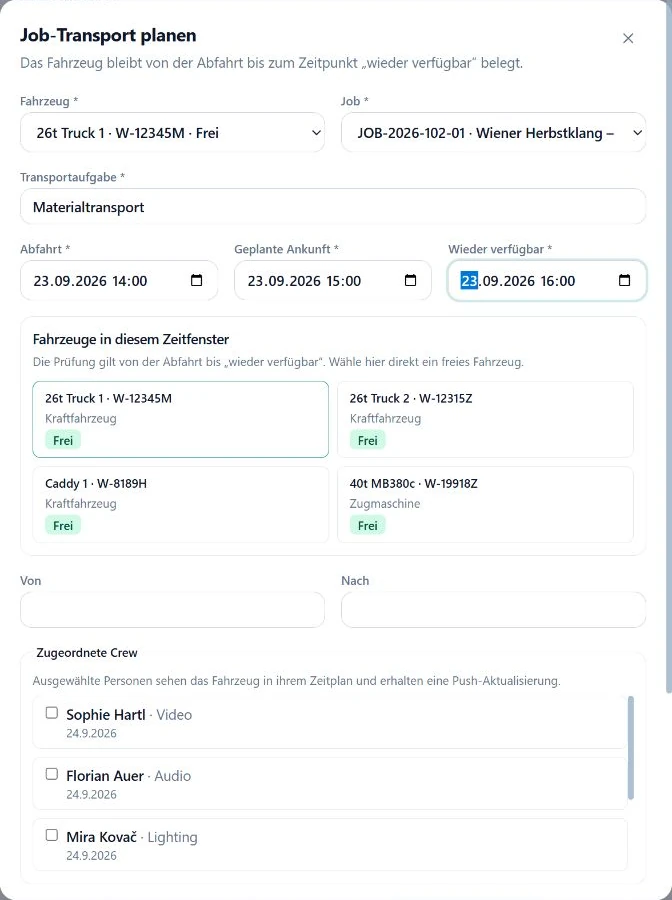
Assign a towing vehicle, paired trailer, driver and passengers to a movement. Driving-licence classes stay visible as a checkpoint for the responsible dispatcher.
02
Block until available again
Reserve vehicles from departure through the realistic return. The next production competes with the real transport window rather than the show time alone.
03
Include maintenance and conflicts
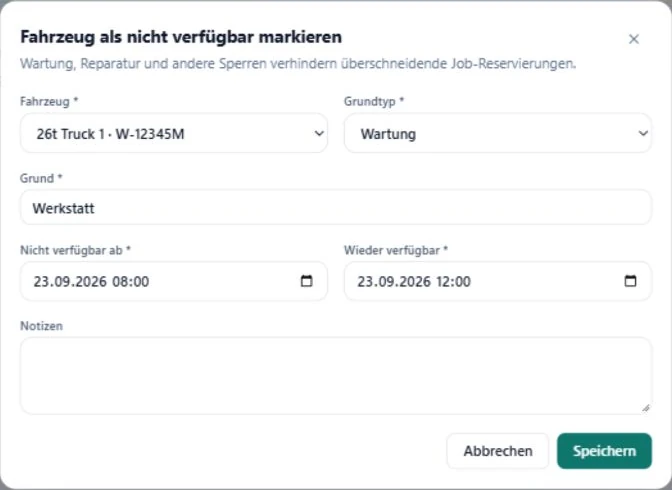
Maintenance, repair and other blocks sit on the same timeline. Overlaps are checked while planning, before two jobs rely on the same vehicle.
Transport and maintenance in the current fleet view
In practice
Test two productions competing for one vehicle.
- Bring two real production windows with travel, work and return.
- Plan the towing vehicle, trailer, driver and passengers.
- Add a maintenance or repair block between the jobs.
- Review where the actual available-again time creates a conflict.
Operating decisions stay with the responsible person
- SAVIE does not optimise routes or calculate driving and rest time.
- A stored licence class does not replace checking the driver's actual entitlement and operating conditions.
- Maintenance blocks document unavailability; SAVIE does not diagnose or technically release a vehicle.
Continue reading
What is SAVIE?
Crew planning for event technology, built around equipment experience.
SAVIE is software for event production and audiovisual companies. Crew, vehicles and working hours live in one system, and staffing is based on who can actually operate the specific equipment.
Crew by equipment experience, not job title
Roles describe the specific equipment, such as a particular lighting console or wireless system. SAVIE shows who has experience with it. A match is a suggestion, not availability and not a booking confirmation.
Connected to easyjob, Rentman and Eventworx
Bring jobs, roles and equipment in from your rental system instead of retyping them. What a confirmed booking sends back depends on the system: the assignment in easyjob and Eventworx, a busy entry in the person's availability calendar in Rentman.
Calendar export for crew and dispatch
Bookings are available as an .ics file, as a quick-add link for Google Calendar and Outlook, or as a subscribable calendar feed. Crew can also connect their Google or Microsoft calendar so busy times are visible during planning.
Crew, fleet and hours on the same job
Transports, drivers and recorded working hours belong to the same job as the crew booking. Planning, vehicle use and follow-up happen without handing over between separate tools.
Questions & answers
Can a trailer be planned with a towing vehicle?
Yes. A reservation can include one vehicle and a paired trailer, with conflicts checked for both assets.
Which time controls the next availability?
The available-again field. It should include the return journey, unloading and the operational handover.
Does SAVIE plan the fastest route?
No. Route, driving time, breaks and technical release remain with the responsible dispatcher and operator.
A demo with your fleet
Test a real vehicle conflict in SAVIE.
We will plan two competing productions with return time, driver, trailer and a maintenance block.