
Vehicle block and planning
Block vehicles for maintenance and replan event transports and trailers
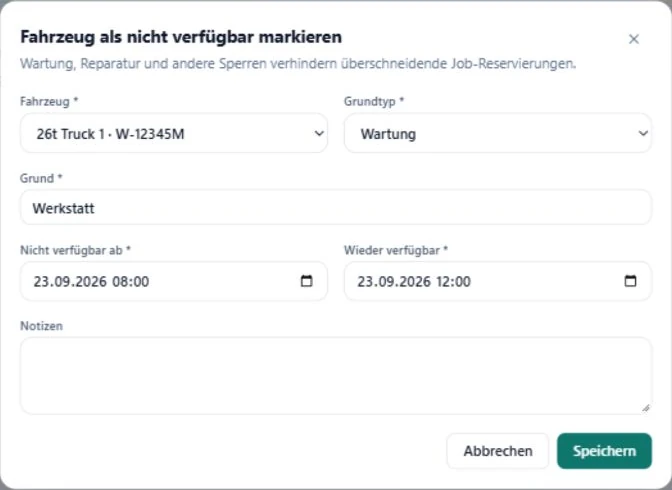
A workshop delay becomes useful planning information only when the vehicle is blocked for the real interval. Transport and paired assets then need another check.
Record unavailability with a real interval
Enter the expected start and end as soon as the workshop time is reliable. Choose a clear type such as maintenance, repair or other block. A general note without an interval cannot protect the next reservation.
Update the end if the workshop returns the vehicle later. Planning can only use the information that is recorded.
View the block beside planned transport
SAVIE combines workshop blocks and job transports in the fleet plan. It checks and blocks overlapping reservations for the same vehicle. Open the affected reservation instead of shortening the maintenance record artificially.
The block records availability. It is not predictive maintenance, inspection scheduling or a statutory fleet-compliance system.
Check tractor and trailer as a pair
When the tractor is unavailable, the reserved trailer is not automatically suitable for every alternative. Check pairing, availability and the shared interval. Conversely, a blocked trailer can stop the transport while the tractor remains free.
Technical compatibility and the driver's entitlement for the combination remain human checks.
Plan an alternative through full availability
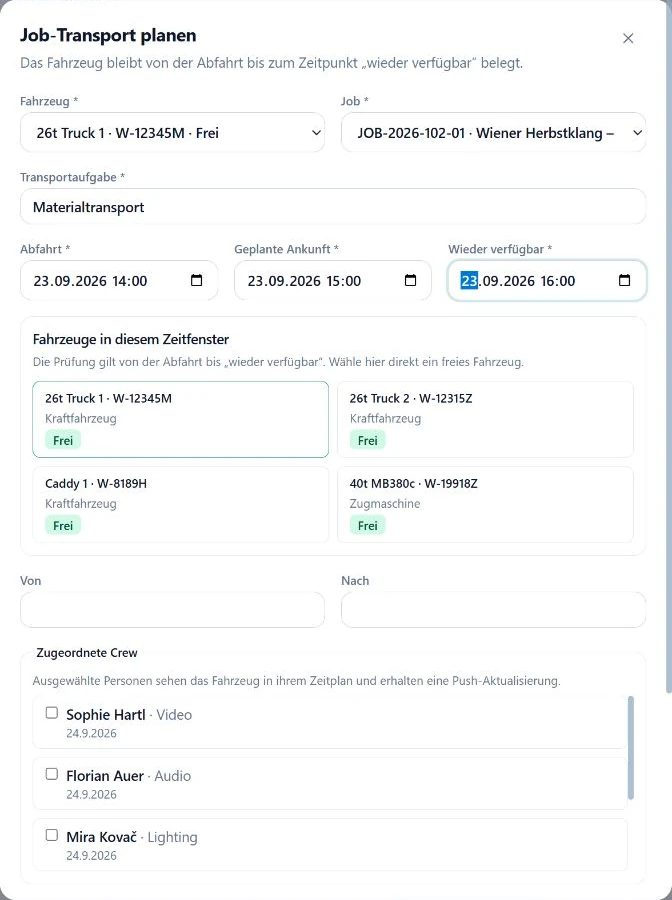
Choose a replacement vehicle and do not copy only the event times. Plan departure, arrival, return and the point after unloading when the asset is ready again. Then inspect the previous and following jobs for overlap.
Carry the change through to driver, crew and briefing
A different vehicle may require another driver, departure time or loading plan. Compare confirmed crew with the new interval and update the transport section of the briefing.
Notify the affected people directly. A new assignment in the system does not replace operational confirmation by the driver and production lead.
Vehicle-outage checklist
Work outwards from the blocked asset: interval first, then transport, pairing, people and communication.
- Block type, start and realistic end recorded.
- Every overlapping transport opened.
- Tractor and trailer checked together.
- Replacement free for the complete commitment window.
- Licence and exact vehicle suitability reviewed.
- Driver, passengers and briefing updated.
- Block end updated after workshop changes.