
Fleet & transport
Fleet planning for event productions: connect vehicles, drivers and crew
An available truck is only one part of the plan. Drivers, crew, trailers and turnaround must also fit the next load-in. This workflow connects transport to staffing.
Start transport planning with the job
If equipment must arrive at 07:00, that is not the departure time. And a truck returning to the warehouse may still need unloading and preparation before its next job. Fleet planning has to cover the full task, including handover and the point at which the vehicle can genuinely be scheduled again.
Define a specific transport task: which vehicle serves which job, where it goes, when it is needed and which crew travels with it. If these details live only in a chat message, a later shift change can leave the transport plan out of date.
Separate departure, arrival and availability
SAVIE reserves the vehicle from departure until its available-again time. That end point is an operational decision. A vehicle may be back on site but still need to be unloaded, checked or prepared.
The following fictional plan illustrates the difference. Adapt travel times, loading work and staffing to your actual production.
| Milestone | Dispatch implication |
|---|---|
| 05:30: departure | Vehicle reservation begins; driver and required crew must be planned. |
| 06:30: planned arrival | Coordinate equipment handover with the load-in team. |
| 17:00: expected return | Check the return; do not assume immediate availability. |
| 18:00: available again | Allow for unloading and preparation before another reservation. |
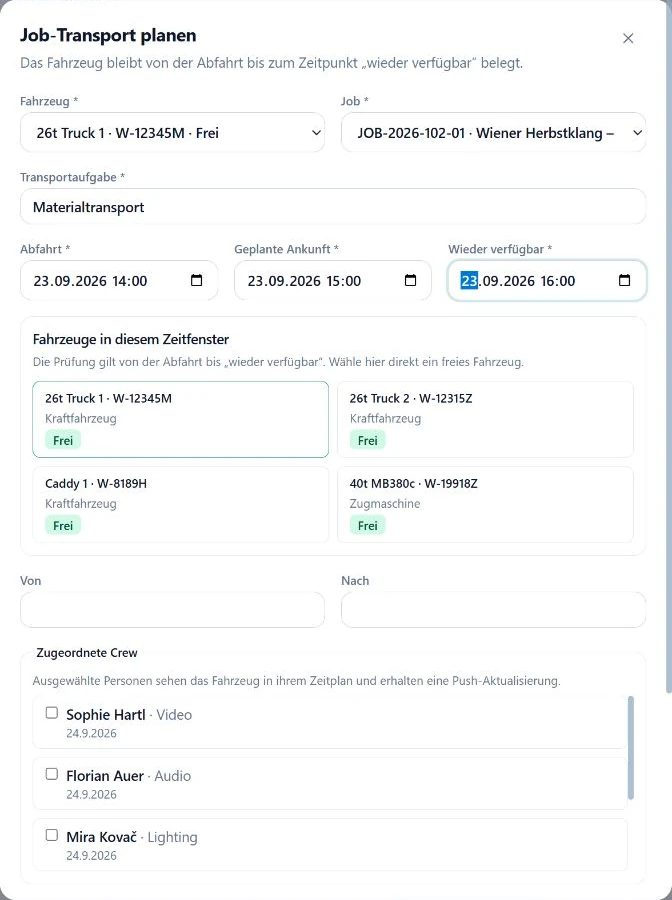
Check the driver and passengers against the same job
A person being available does not automatically assign them as the driver. Check who drives, who travels and whether their shifts match the transport. Someone scheduled only for show call cannot be assumed to cover an early warehouse departure.
In SAVIE, select the assigned transport crew from confirmed job bookings and choose the driver from that group. A driving-licence skill on a profile is a planning signal, not an independent verification of legal entitlement. Your company still needs its own checks for the person and vehicle combination.
Block maintenance as carefully as jobs
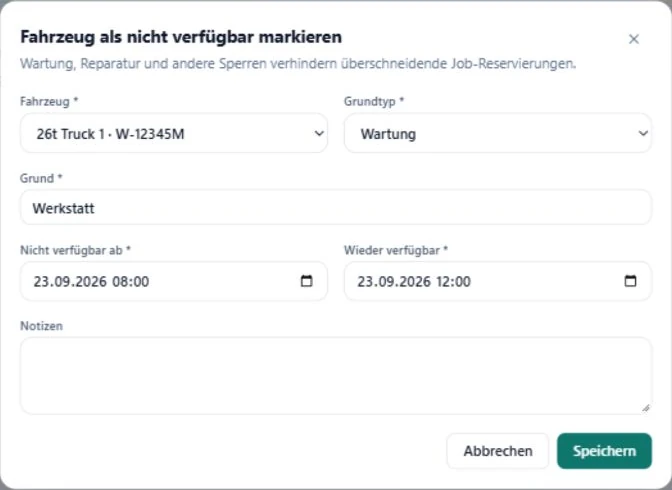
Workshop appointments, repairs and other blocks belong in the same plan as production work. A separate maintenance calendar is easy to miss during dispatch. Record the start and end of unavailability, then update the block if the return is delayed.
SAVIE distinguishes maintenance, repairs and other blocks. Overlapping reservations for the same vehicle are checked and blocked when planning. The inputs still matter: a calendar cannot account for a workshop extension that nobody has entered.
Treat a tractor and trailer as a combination
For an articulated combination, a free tractor is not enough. The appropriate trailer must be available for the same window. SAVIE supports paired transport planning for tractors and trailers. When times change, review both resources.
Before a busy production weekend, check the upcoming runs, blocked vehicles, assigned crew and available-again times. Use the fleet day or week view alongside the broader resource plan to see how transport fits the productions.
A checklist before confirming transport
This check is useful even if your current workflow uses spreadsheets. If each answer requires opening several chats and calendars, bring that scenario to a demo. A real load-in and return run provides a better basis for evaluating fit than a generic feature list.
- Job and transport task are clear.
- Vehicle and any trailer are available for the full window.
- Departure, arrival and available-again times are realistic.
- Driver and passengers are agreed; required checks are complete.
- Workshop and repair blocks are current.
- The latest job change has been reviewed with crew and dispatch.