
Time tracking
Time tracking for event production: from load-in to approval
The crew schedule records the plan. Your post-production review needs reliable actual hours. Here is how to organise recording, queries and approval.
Keep three kinds of time separate
Load-in starts late, the show overruns and load-out continues after midnight. Copying Monday's figures straight from the schedule loses those differences. Reliable time tracking starts by separating the planned shift, the work actually performed and the hours that have been checked.
For example, a technician is scheduled from 08:00 to 17:00, finishes at 17:30 and takes 45 minutes of breaks. That is 9.5 hours of attendance and 8.75 hours of work. This illustrates the calculation, not permitted working hours. Travel, standby and supplements must follow the arrangements applicable to your business.
- Planned time: the basis for dispatch and the crew briefing.
- Actual time: what happened, including breaks and any explanation needed.
- Approved time: a checked record for subsequent processing.
Assign responsibilities before the first shift
Decide who records hours, who resolves questions and who approves them. Give the team a short process for late submissions and differences from the schedule. Use a concrete example to explain what should be recorded for warehouse preparation, on-site work and other activities.
SAVIE Company Time is primarily intended for employees. Freelancers normally report actual hours against bookings; enrolling them in Company Time is a separate option. Make that distinction before rolling out the process so the same work is not entered in two places. Time review and approval require the appropriate administrative permissions.
Record work and breaks consistently
SAVIE provides a live clock with start, pause, resume and finish events, as well as manual entry of hours. Agree when each method should be used. A later correction should have an understandable reason rather than silently replacing the planned shift.
Manual entry separates working hours and break minutes. Avoid counting a break as work and then deducting it again in a downstream calculation. Check this with a shared example. For an overnight shift, also verify the date and allocation of the work before calculating a duration from two clock times.
Resolve questions before approving
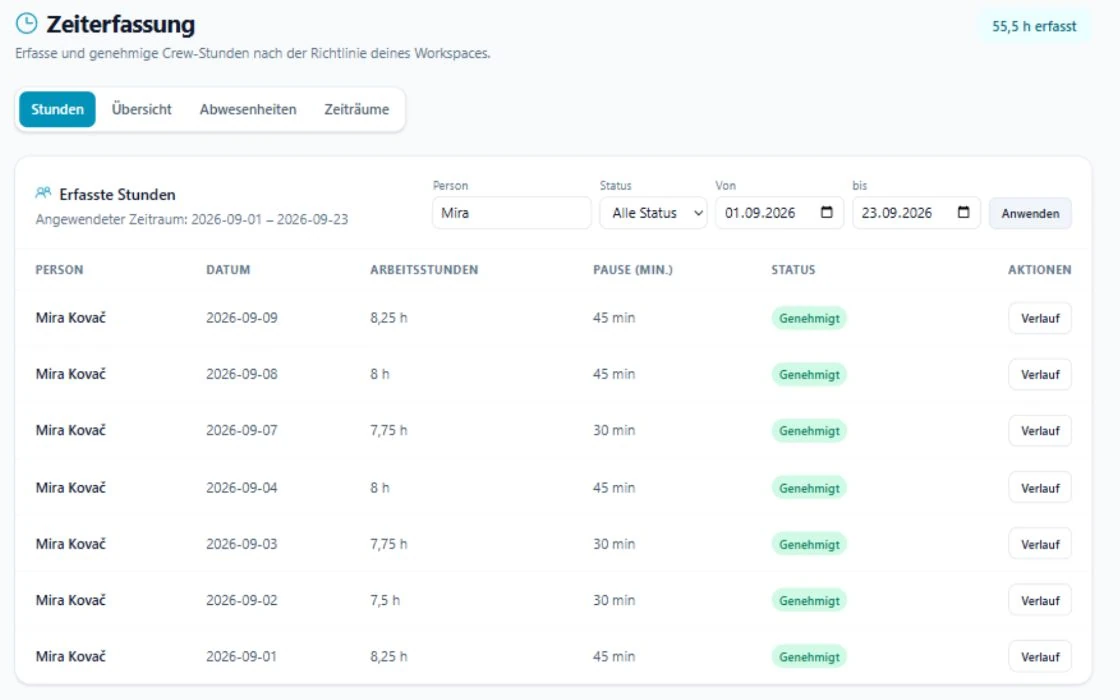
Check more than the total. A plausible month-end figure can hide a duplicate or incorrectly dated entry. Apply the intended date range and narrow by person and status when needed. Approval should cover the records you have actually checked.
A short explanation helps resolve a discrepancy: did the show start late, did work begin at the warehouse, or was a break added afterwards? SAVIE's entry history makes events and changes traceable. It supports the conversation with the crew member rather than replacing it.
- Is this the correct person and recording workflow?
- Are the date, hours and breaks plausible?
- Have unexpected differences from the schedule been explained?
- Have outstanding questions been resolved before approval?
Treat month-end as a separate step
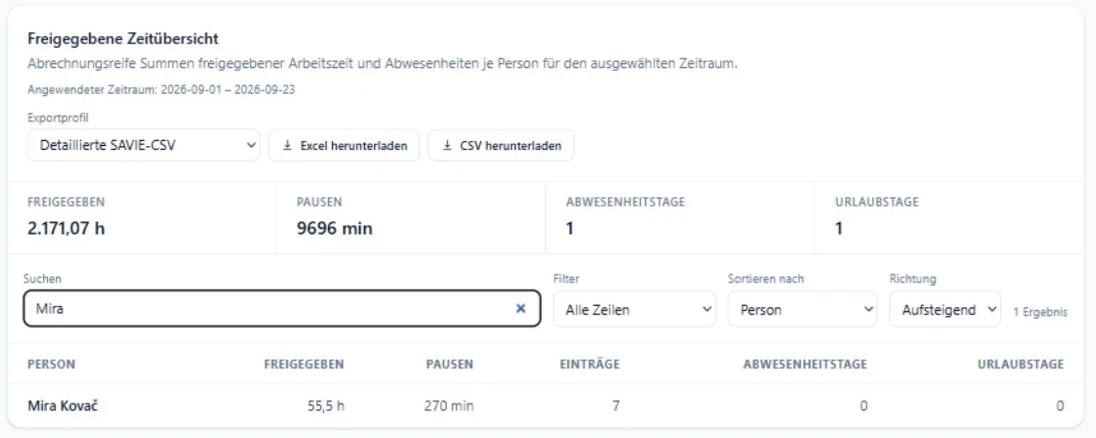
Closing a period requires a defined date range and a clear data state. SAVIE provides summaries and Excel and CSV exports. Before handing over a file, verify which people, dates and statuses the selected export includes. A file export is not a configured payroll process or a guaranteed integration with every payroll product.
Agree how late submissions will be handled when you use closed periods. Corrections need a traceable process; simply sending a differently named spreadsheet can create competing versions of the same records.
A checklist for your next production month
Test the process with one completed job. Compare the schedule, submitted hours, resolved queries and exported data. This reveals missing information and duplicate entry. The crew-plan template linked below supports planning before a job; it is deliberately not an actual-hours record.
- Choose the recording process for employees and freelancers.
- Assign an owner and deadline for queries.
- Work through one example of hours and breaks with the team.
- Check person, period and status before approval.
- Agree the export and downstream process using a sample record.
- Document how later corrections are handled.