
Template and time tracking
Event crew timesheet: a template for breaks, shift changes and approval
A useful timesheet records more than a daily total. This template connects the job, start and end times, breaks, corrections and a traceable review status.
What an event-production timesheet needs
Crew may change task, location or shift between load-in, show and load-out. A single daily total does not explain which job the time belongs to or how it was calculated. Record the person, job, task, dated start and end, break, status and a correction note.
The job reference matters when one person works across productions on the same day. It lets the reviewer compare the entry with the schedule and resolve questions. A timesheet is an operational aid; your agreements and applicable rules determine any additional records your company needs.
Download the blank template and completed example
The Excel workbook contains a blank sheet and a fictional completed example. Enter a date and time for both start and end; net hours are calculated after the break. Incomplete rows stay blank and implausible input is marked Check.
The PDF contains the same two versions for printing or review. Use the example to agree one input rule with the crew before recording real jobs.
Record both dates for an overnight shift
For a shift from 20:00 to 02:00, times alone are ambiguous. Record the start on 26 September and the end on 27 September. A 30-minute break produces 5.5 net hours. An end date on the starting day would make the sequence implausible.
This arithmetic only describes recorded duration. It does not decide premiums, permitted shift lengths, rest periods or pay.
| Field | Value |
|---|---|
| Start | 26 September 2026, 20:00 |
| End | 27 September 2026, 02:00 |
| Presence | 6.0 hours |
| Break | 0.5 hours |
| Net time | 5.5 hours |
Move from entry to reviewed time
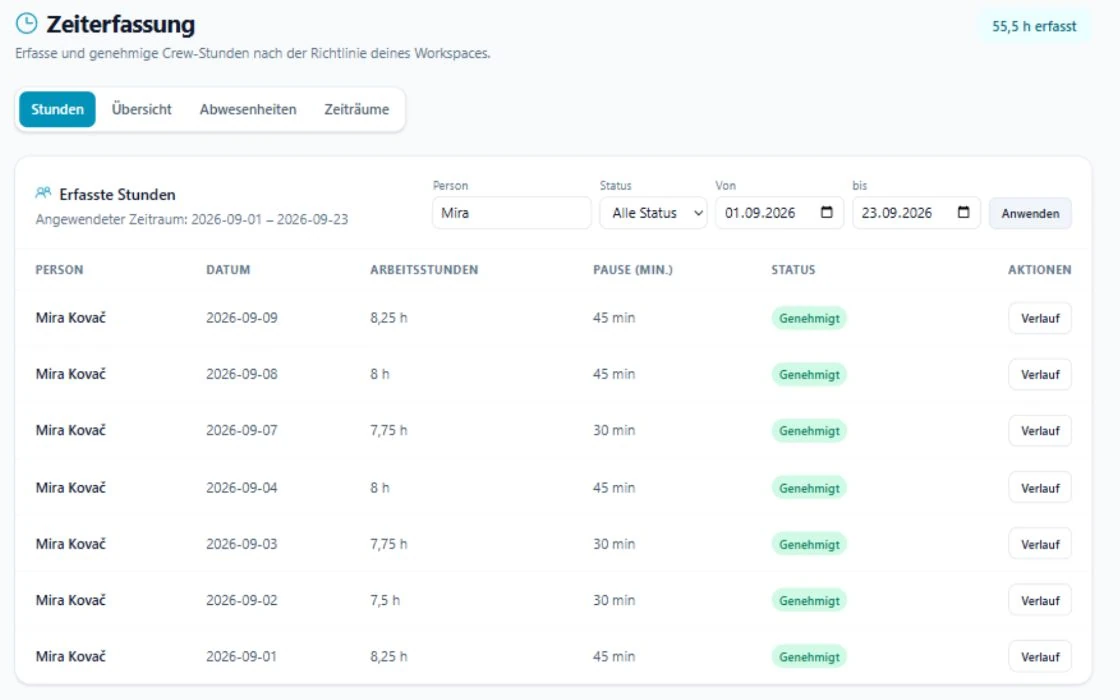
SAVIE brings working hours, breaks, the job reference and status together in the time register. Review the person, date, note and edit history as well as the total. Resolve a query before approval.
Company Time is primarily the workflow for employees. Freelancer actual hours belong to the booking workflow unless the workspace explicitly enables that person for Company Time as well.
Version corrections instead of overwriting them
When an entry changes, retain the reason. Record whether the end changed, a break was added or the job reference was corrected. Include the reviewer and review date.
An approved file is a defined handover state, not an automatic payroll run. Decide how later entries replace a file that has already been sent.
Checklist before approval
Use the same order for every review. It reduces queries and stops a plausible monthly total from hiding incorrect individual days.
- Person, job and task are unambiguous.
- Start and end include dates and times.
- The break is counted once.
- Overnight shifts end on the following day.
- Corrections include a short reason.
- Status, reviewer and version are visible.