
Leave and crew planning
Include leave and absences in peak-season event crew planning
A leave request is not yet an approved absence, and missing calendar data is not a confirmation. Connect review and production planning without exposing private reasons.
Treat three states separately
For scheduling, requested leave, approved absence and unknown availability have different meanings. A request needs a decision. Approved absence is a known constraint. Missing information needs a query and must not be read as approval.
This distinction avoids removing crew from a job too early or confirming someone whose availability remains unclear.
Review future requests in the correct range
The current SAVIE view places pending requests first even when their dates are in the future. Bulk approval additionally uses an explicitly selected date range. Set status and range deliberately and inspect the displayed result count before processing several records.
For one urgent request, open the individual row first. Use a bulk decision only when every intended person and date is inside the chosen range.
Share only the information scheduling needs
Scheduling usually needs to know that the person is unavailable for the relevant interval. Private illness or leave details do not belong in job titles, briefings or widely visible notes.
Define who reviews absences and who handles their effect on productions. Those responsibilities can belong to different people.
Inspect affected productions in the resource plan
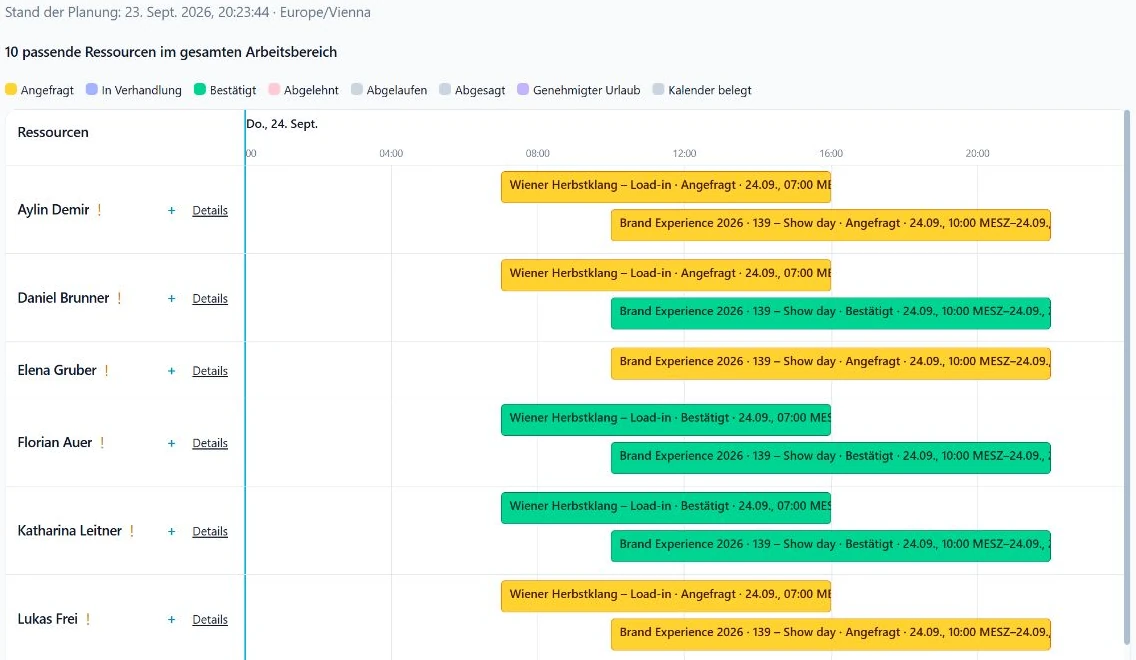
After the decision, open the resource plan for the absence interval. Check confirmed bookings, pending requests and open roles. Filters narrow the view but do not prove that nothing exists outside the visible selection.
The resource view places bookings and other commitments on one timeline. Open the source before replacing a person or changing the job.
Plan cover without publishing the reason
Phrase the operational task neutrally: fill the role again, check the shift, update the briefing. The replacement needs location, task, call time and transport, not the private reason for the change.
With little notice, check role and equipment first, then availability, and finally the explicit booking response. A candidate suggestion is not a confirmation.
Peak-season checklist
A repeatable sequence helps when several productions run in parallel.
- Pending requests and future dates reviewed.
- Decision recorded by the responsible role.
- Only necessary availability information shared.
- Affected confirmed and pending jobs opened.
- Replacement checked for role, equipment and availability.
- Briefing and transport updated after confirmation.