
Integration
Connect easyjob and SAVIE: from source job to booking response
A practical workflow for WebAPI setup, import scope, role and equipment mapping, booking responses and sync failures.
Keep easyjob as the source for production data
The connection extends easyjob with SAVIE's crew workflow. Projects, jobs, staffing allocations and material context come from the configured easyjob instance. SAVIE handles matching, requests and booking responses for the supported scope.
Setup covers the WebAPI address, credentials, SAVIE's address in easyjob and the import scope. One organisation uses one active ERP connector at a time.
Choose the import scope deliberately
The SAVIE-address scope imports allocations assigned to the configured SAVIE address. A wider scope can include all requested or confirmed allocations. The choice controls which staffing needs appear in SAVIE.
Only supported states become dispatchable roles. A merely preferred easyjob allocation is tentative planning, not a real request, and is not treated as open SAVIE demand.
From equipment to the right crew
- 01easyjob → SAVIE
Bring your production with you
Jobs, staffing requirements and the equipment and material list from easyjob.
grandMA3Yamaha CL5Truss - 02SAVIE
Equipment becomes disciplines
grandMA3LightingYamaha CL5AudioTrussRiggingSAVIE can automatically assign equipment to disciplines in many cases and suggest relevant gear skills. Review the mapping and find crew with the right experience.
- 03SAVIE → easyjob
Booking responses back to your ERP
You decide whom to request. Booking responses flow back into your easyjob resource planning.
Trace one job from the source into SAVIE
Take a production with load-in, show and load-out: easyjob provides project and job references, dates, staffing allocations and the bill of items. SAVIE keeps source IDs so later runs update the same records instead of creating duplicates.
Role names are mapped to SAVIE disciplines. Equipment from the bill of items is imported as a snapshot and, after a confirmed mapping, can become concrete requirements on the relevant roles.
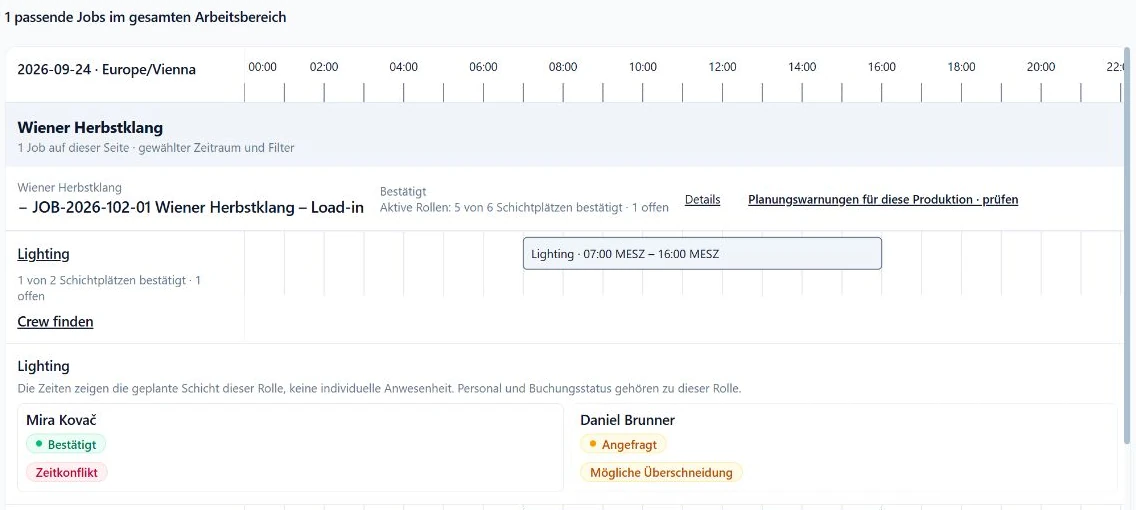
Choose crew and return a supported response
Dispatchers review requirements, candidates and availability in SAVIE, send a request and handle the response. A confirmation is returned only in the supported easyjob context when the required resource-allocation mapping exists.
This is not an every-field, both-directions promise. SAVIE does not invent easyjob contacts or overwrite arbitrary source data. Test the states used by your actual process with a representative job.
Handle changes and cancellations safely
Later easyjob runs update existing projects, jobs, roles and equipment snapshots. A source-side cancellation can cancel the corresponding SAVIE booking; existing booking and invoice history is not blindly deleted.
Objects that disappeared from the source are cleaned up only after a complete run without errors. An empty or partial response is not treated as proof that easyjob data was deleted.
Review sync history and retry with context
Manual and scheduled runs record counters and bounded error details in sync history. A problem in one organisation does not automatically block the others, and a later run continues from the same source identifiers.
After changes to credentials, permissions or the easyjob structure, rerun the connection test, check the selected scope and inspect one sample job. The connection reduces repeated entry while keeping exception handling with the team.