
Crew briefing and checklist
Event-production crew briefing: checklist for location, call time and transport
A confirmed job needs one clear operational version. This checklist combines arrival, task, contact roles, transport and approved documents for the crew.
Answer the questions that arise before travel
Before the job, each crew member should know where to go, when to arrive, which role is confirmed and who decides when something changes. Include meeting point, access, call time, shift end, contact roles and the current plan version.
Use a version or update date. An old PDF in chat should not continue unnoticed beside a newer job state.
Separate confirmed details from open points
Mark what is confirmed and what still needs resolution. A requested crew member is not yet confirmed. A planned transport time is not yet an agreed ride. Give every open point an owner and due time.
Crew needs the operational state rather than the internal discussion. Resolve contradictions before sharing or mark them clearly.
Review the job, roles and responses together
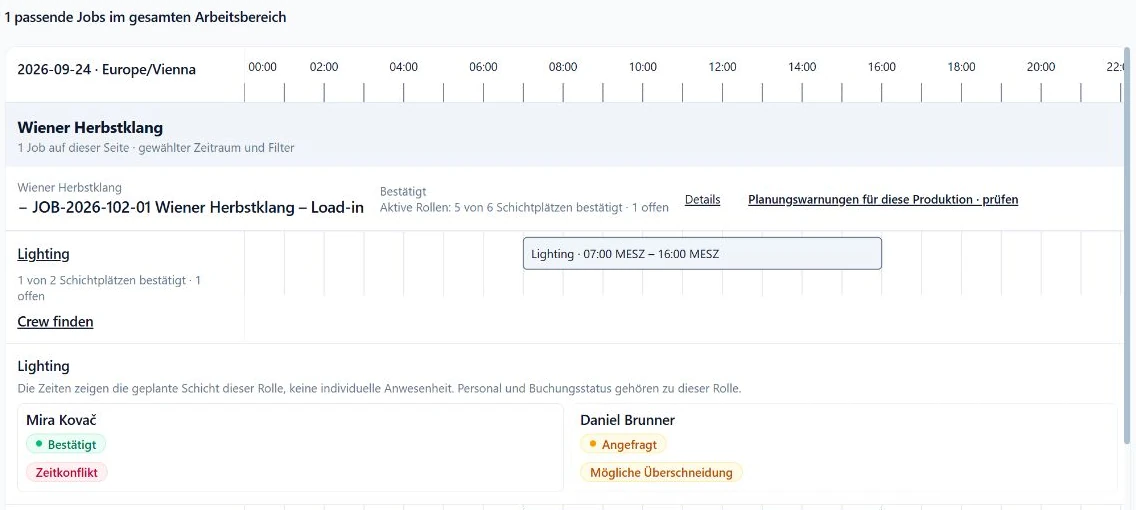
The SAVIE production view shows role demand, confirmed crew and pending responses on the same job. Use it as the checkpoint before the briefing: are all shifts covered, do times match and is each named person confirmed?
Role windows are planned values. Actual hours are recorded after the job in the relevant time workflow.
Give transport and documents an audience
State departure location, driver, passengers, planned return and the contact role relevant to crew. After a change, verify that vehicle and people still fit the new window.
Share only documents intended for confirmed crew. Internal production files, private contact details or unapproved versions do not automatically belong in the briefing.
Keep equipment requirements separate from instructions
Equipment experience helps choose the person. The briefing describes the task on site. Instead of only Lighting, write something like take over the grandMA3 showfile and complete the system check with the technical lead.
A profile or match value is not a certificate. The scheduler retains responsibility for skill review and booking.
Checklist before sending
Repeat the list after every material job change and actively notify affected crew.
- Project, location and plan version included.
- Call time, meeting point and access clear.
- Confirmed role, task and shift stated.
- Contact roles used without unnecessary private data.
- Transport, driver and return agreed.
- Only approved documents linked.
- Open points have an owner and deadline.